The Problem: Four Apps, Zero Overview
Workouts and sleep in Google Health. Weight in Withings. Food logged in MacroFactor, which thankfully reports straight into Google Health — small mercy. Bloodwork sitting in a spreadsheet I had to update by hand every time I got labs done. No single place to see the whole picture — just four apps and a lot of copy-pasting between them.
Meanwhile I’d been reading posts from people who built gorgeous custom dashboards for their home automation setups, or for keeping an eye on their homelab Kubernetes clusters. Cool projects, genuinely. But it made me wonder: if people will spend a whole weekend dashboarding their smart lights, why isn’t anyone dashboarding the thing that actually matters most — themselves?
So I went looking.
Turns Out the APIs Are There
Both Google Health and Withings expose real, usable APIs. Google’s is even CORS-open enough that a browser can call it directly — no backend required at all. Withings needs a client secret for its OAuth flow, so that meant one small, stateless Azure Function whose only job is token exchange. Nothing more.
That sounded simple. It was not simple. It was a rabbit hole with a “welcome” mat.
Two AIs, No Adult Supervision
Full disclosure: I didn’t write every line of this myself. Claude Code did the heavy lifting on actual implementation, while GitHub Copilot’s cloud agent picked up the smaller stuff in parallel — minor fixes and tweaks I’d just file as GitHub issues and let it run with. Why both? Because I can. Okay, half-kidding — the real reason is that while Claude Code was deep in a big change, I could hand Copilot a handful of small issues and have them worked on at the same time, instead of queuing everything behind one agent. Some would argue either tool alone could’ve handled all of it. Probably true. But I’ve got both, so why not spread the tokens around.
The Copilot cloud agent side was also a deliberate experiment: I wanted hands-on experience with it, because the idea of working purely against a GitHub repo — no local dev environment, no cloned repo, nothing installed on my machine — looks genuinely promising. File an issue from your phone, come back later to a PR. That’s a workflow I want to lean on more.
And credit where it’s due — I was more than happy to let Claude Code use its CLI access to poke through Azure logs and check GitHub repo configuration itself, instead of me tabbing between the Azure Portal and GitHub settings by hand. Small thing, but it adds up. All in all, a lot of lessons banked for next time.
The Rabbit Hole
The docs lie (politely)
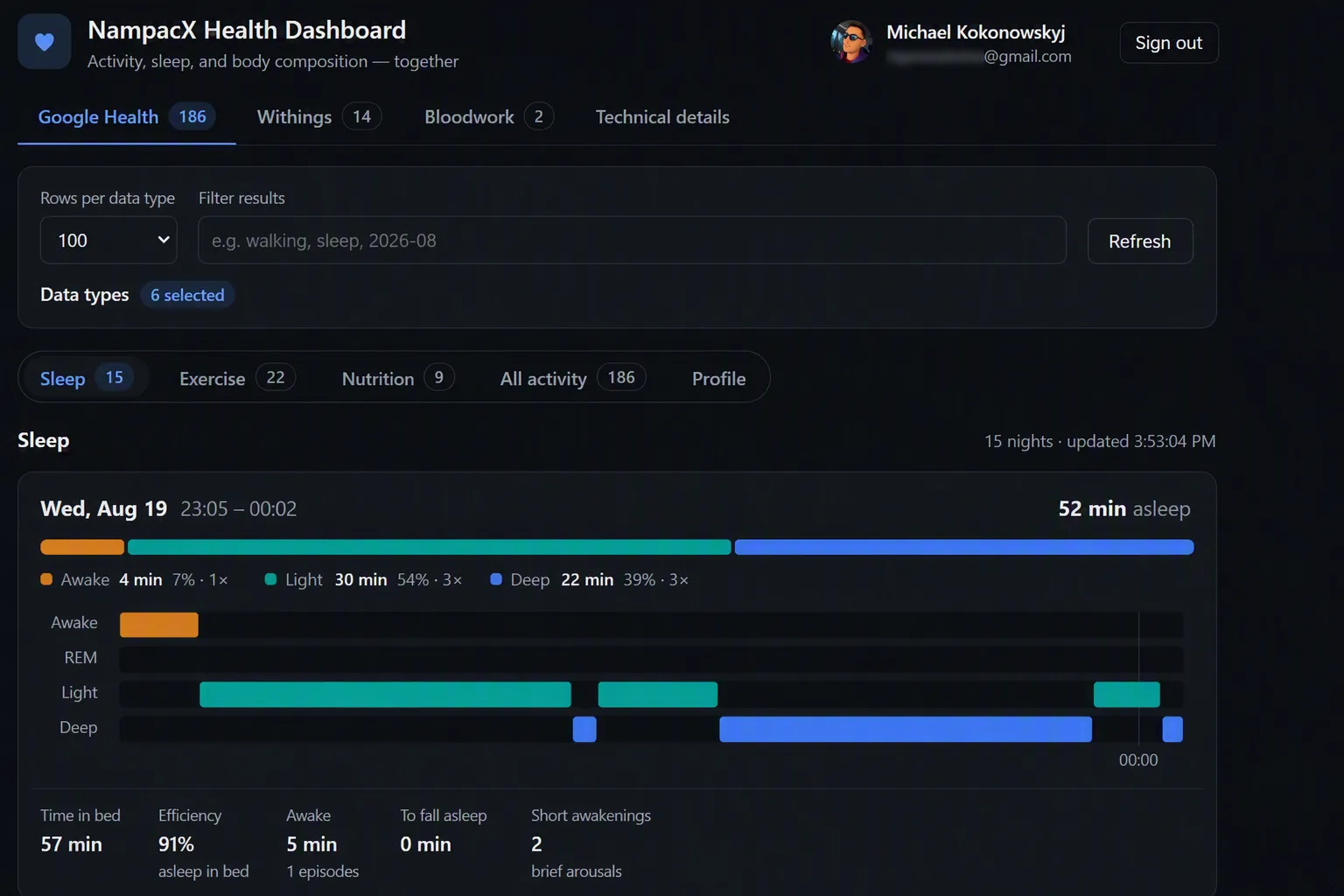
Google’s official RPC reference for sleep data doesn’t match what the REST API actually returns — the field names are entirely different. Claude Code built a whole parser straight off the documentation, ran it, and every single night came back as “0 min asleep.”
Turns out I wasn’t sleeping badly. I was reading the wrong fields. Threw the parser out, rebuilt it from a real captured payload, and suddenly I had a functioning circadian rhythm again.
Withings’ refresh token has main character energy
Withings rotates its refresh token every single time it’s used — and the old one dies the instant the new one is issued. Blink and you’ve locked yourself out of your own data. The fix is boring but non-negotiable: persist the new token to storage the moment it lands, before you do anything else with it.
There is no “sleep score” hiding in the API
I went looking for it. It’s not there. That number is computed on-device by the phone app and the watch — Google doesn’t expose it anywhere. Good to know before you burn an afternoon searching for a field that was never going to exist.
Not everything likes to be listed
Some data types don’t support a simple “give me a list” call — they need a completely different daily-rollup endpoint instead. Consistency was apparently optional this week.
The theme across all of it: every one of these was a confidently wrong number, not a crash. No stack trace, no error, just data quietly lying to my face. That’s the worst kind of bug to catch, because everything looks fine until you actually know what “fine” is supposed to look like.
What I Ended Up With
A React SPA that:
- Connects to Google Health and Withings independently — either one alone, or both together
- Normalizes the data from both into one shape
- Gives me a single dashboard for activity, sleep, weight, and bloodwork
One place. One truth. No more four tabs and a spreadsheet held together by hope.
Google Health  ──┐
                 ├──► Normalize ──► React Dashboard
Withings       ──┘
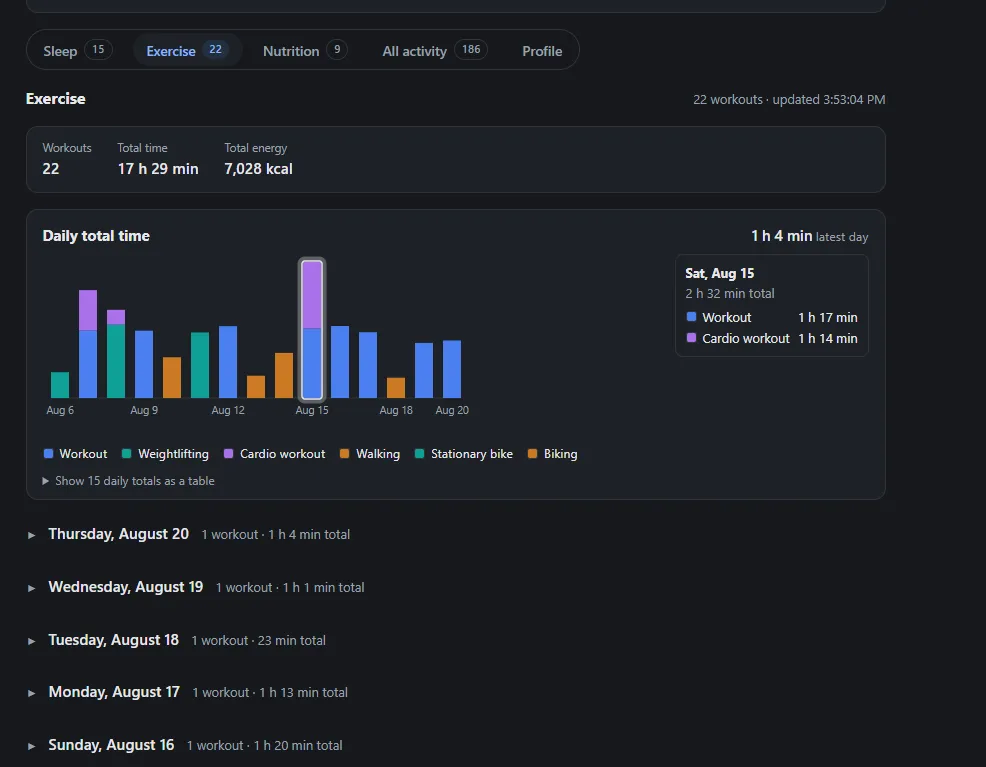
Exercise data, complete with daily totals and a breakdown of workout types:
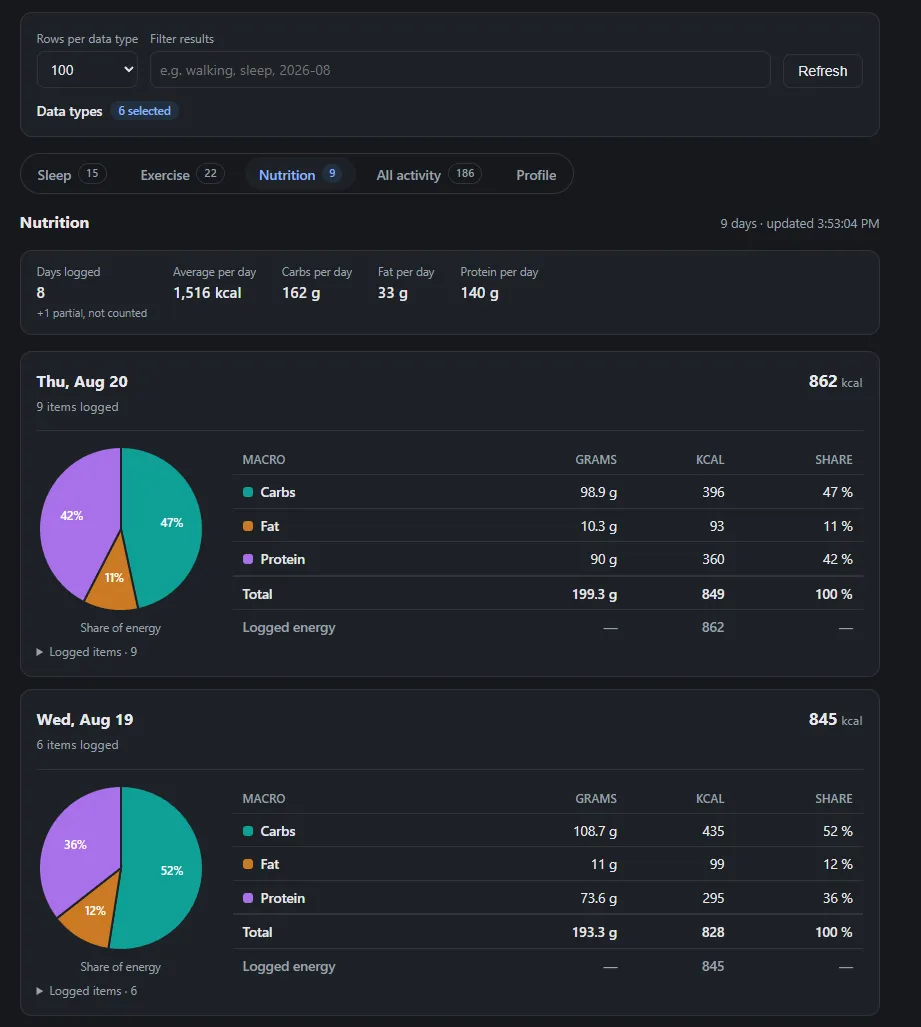
Google Health also quietly hands over nutrition data, which I wasn’t even expecting to use — logged calories and macros, per day, synced in from MacroFactor:
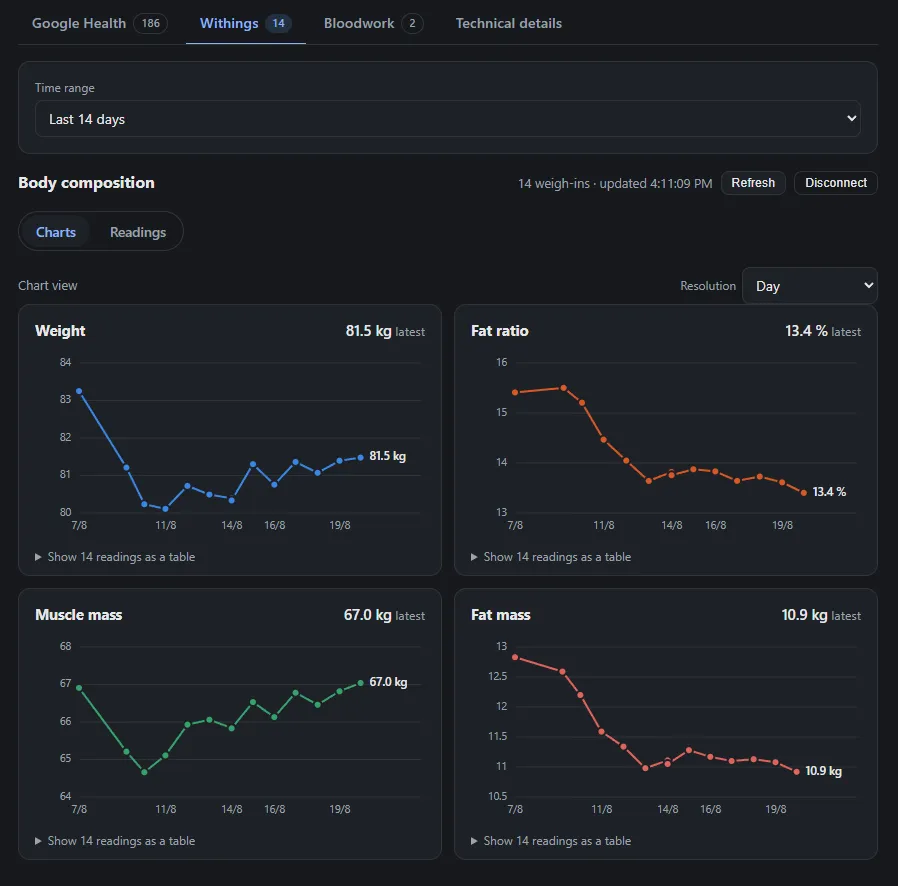
And body composition from Withings — weight, fat ratio, muscle mass, all trended over time:
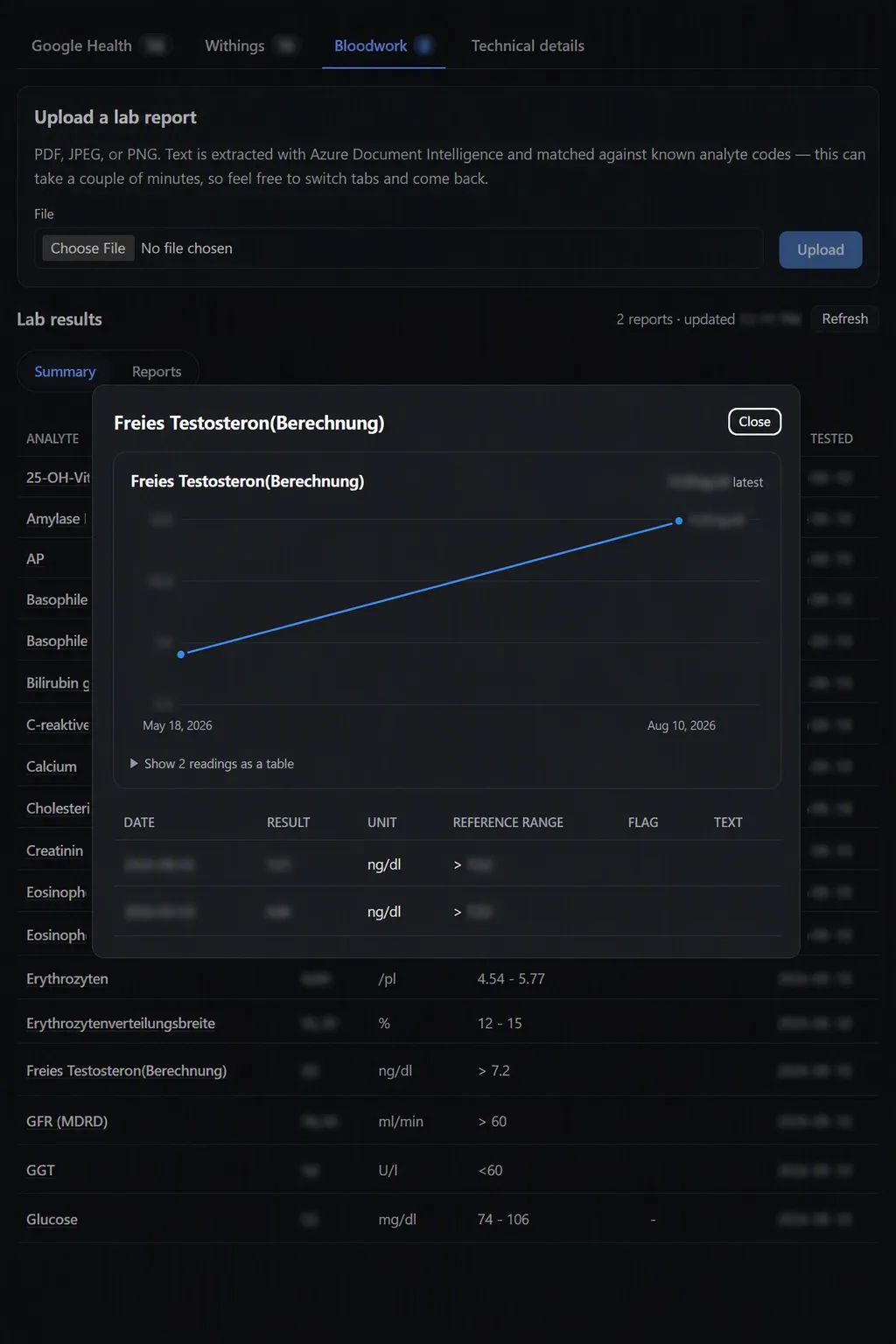
The bloodwork tab turned into its own mini side quest: upload a lab report as a PDF or image, run it through Azure Document Intelligence, and match the extracted values against known analyte codes so they land in the same trend view as everything else.
Still a Personal Project, Still Fun
This isn’t trying to be a product — it’s my own data, on my own terms, in one screen instead of four. But it’s been a genuinely good excuse to dig into OAuth edge cases, undocumented API quirks, and the age-old developer question: why is it this hard to get my own data out of the apps I willingly put it into?
If you’ve built something similar for your own health data — or you’re thinking about it — I’d love to compare notes.